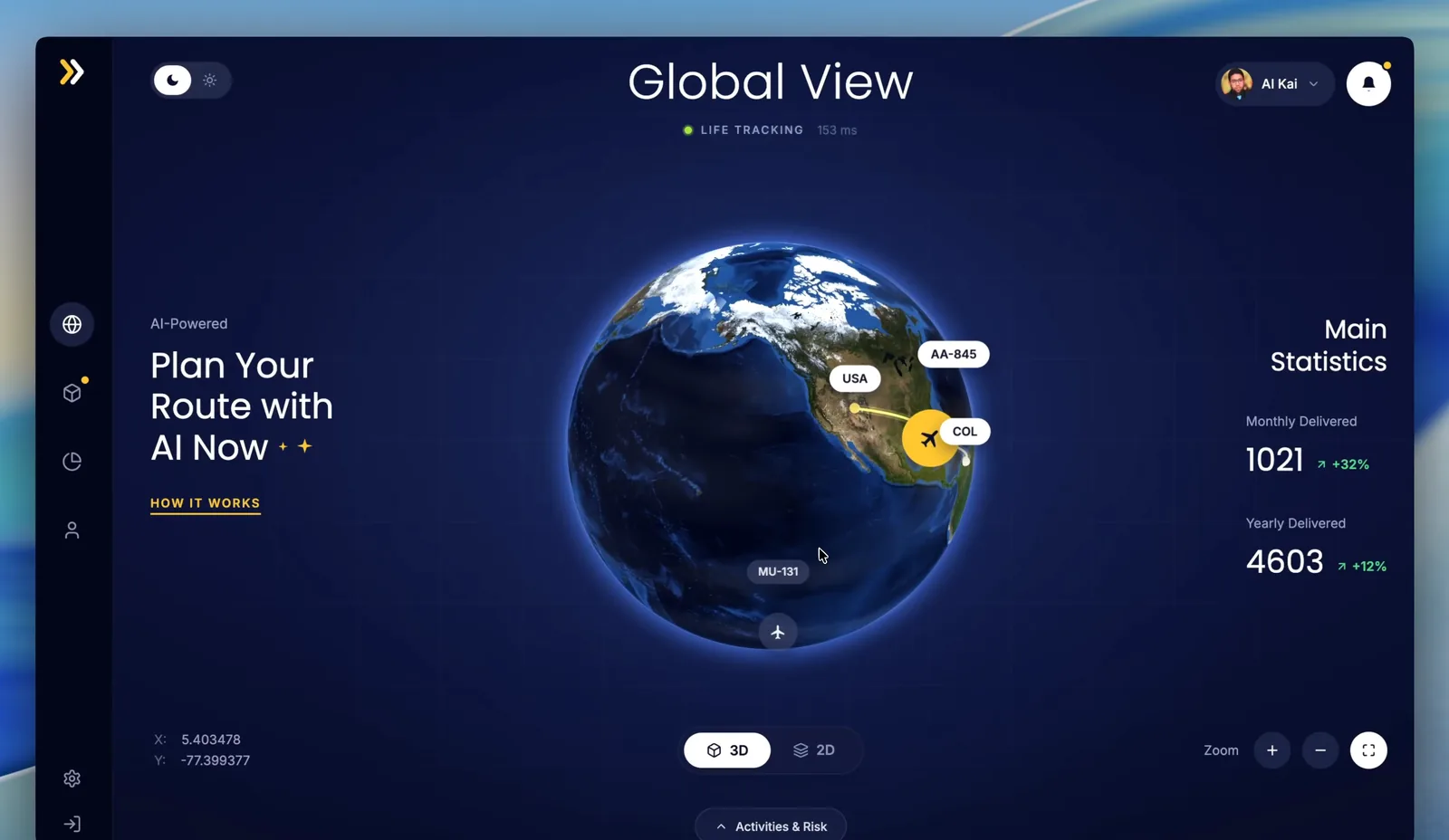
GPT-6 Astra rebuilt this 3D globe dashboard from one screenshot and one prompt.
I asked for a static page. Three.js, React, Tailwind. No npm. A real Earth you can drag, not a PNG. The bottom activities panel had to stay collapsed on first load so it did not cover the globe.
The result is live: hqman.me/demo/gpt-6-astra-3d-globe/
What I asked for
Same frontend test I use on other models. One reference image. One prompt. Pixel-close layout. Dark logistics UI. Sidebar, title, route tags, stats, zoom controls. Chrome to check the page against the screenshot.
The extra constraint was the drawer. In the screenshot it covers part of the Earth. I told Astra to keep it folded until you click the handle at the bottom.
I also told it not to copy other demos in the repo. Build this page on its own.
The prompt
This is the English prompt I used:
I want to build this HTML page as a single web page using Three.js, React, and Tailwind CSS.

Please recreate the reference image as closely as possible, with a high-fidelity, realistic, polished dashboard style. The page should look almost exactly like the screenshot, including the dark futuristic layout, the large 3D Earth, the sidebar, the top title, route markers, statistics area, zoom controls, and all major UI elements.

The 3D Earth must be implemented with Three.js, not as a static image. It should look realistic, support smooth mouse dragging, and feel highly interactive. The globe interaction is very important. Users should be able to rotate it smoothly with the mouse, and the visual effect should feel premium and responsive.

One important change: the bottom panel that covers part of the Earth in the screenshot should be collapsed by default. It should not block the globe when the page first loads. Add a small button or handle at the bottom. When the user clicks it, the bottom panel should slide up and show the activities table and the risk card, matching the style of the screenshot. The panel should also be collapsible again.

The popup panel under the image must stay collapsed by default. Do not expand it on first load.

Please focus on making the final page visually close to the image, with strong attention to layout, spacing, colors, typography, shadows, glass effects, smooth animations, and interaction performance. The final result should feel like a production-quality logistics dashboard, not a rough demo.

Call Chrome yourself to verify the page against the original screenshot until it is pixel-perfect. Keep it simple. Do not use npm. This is a static webpage.

The effect has to look striking. This demo is for a live presentation.

Do not use any other pages in this project as a reference. Complete this independently. Earlier demos already exist in this directory. Do not copy them.
What shipped
Astra returned a static HTML page with a Three.js Earth, day/night lighting, cargo routes, and a drawer that stays closed until you open it.
Drag works. Scroll zoom works. The handle at the bottom says Activities & insights 04. Click it and the table plus risk card slide up. Click it again and they drop away.
I shipped it as a static folder under /demo/gpt-6-astra-3d-globe/. No extra screenshots. Unused Earth textures stayed out to keep the folder smaller.
Watch the walkthrough:
This is still one frontend test. Fable 5 and Ox Alpha already passed a close version of it. Astra's pass is the one you can drag inside this post.